Turn PDFs and videos into personalized study paths on Android
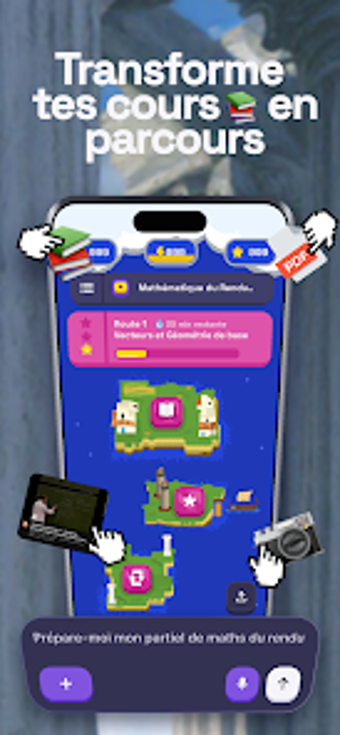
Convert a PDF, YouTube link, or a photo of notes into a step-by-step study plan: BrainQraft generates short lessons, quizzes, and mini-games from uploaded material. The developer, BrainQraft, places an AI mentor chat at the centre of the workflow to set goals and tailor exercises. The app supports chapter-by-chapter progress tracking, multiple input formats, and gamified rewards, making it suitable for students, career changers, and curious adult learners who want guided, bite-sized study sessions.
What the app does with raw content
BrainQraft converts diverse media into structured lessons. It accepts PDFs, YouTube URLs, and photos of lesson notes, then produces a sequence of short chapters with quizzes and flashcards. The app separates content into three study modes: Learning Mode for guided chapters, Practice Mode for exercises, and Discovery Mode for self-paced exploration. This approach turns static documents or videos into discrete learning steps the learner can follow on a mobile device.
How the learning method adapts to users
Personalization relies on an AI mentor and adaptive paths. Users chat with the mentor to define goals, and the app tailors lesson length and difficulty to those goals. Progress is tracked on a chapter-by-chapter basis, and the system adjusts exercises as the learner advances. The pedagogical model mixes short lessons with spaced reviews through flashcards and quizzes to support retention in repeated, manageable sessions.
Who the app suits and accessibility limits
Designed for self-learners and educators assigning focused study. Target users include exam students, professionals retraining, and hobby learners; the app’s input flexibility supports subject variety. The interface supports mobile study on Android devices and requires users to supply source material for custom courses. Language support and specific accessibility settings are not detailed, so teachers should verify device compatibility before classroom rollout.
How progress and motivation are communicated
Progress tracking pairs with gamified incentives. The app shows chapter-level progress and issues XP, daily streaks, quests, and unlockable rewards to encourage regular study. Practice Mode provides repeated exercises for reinforcement, while the mentor chat refines goals based on progress. The combination of measurable chapter completion and visible rewards makes study milestones explicit for learners and instructors.
Clear fit for learners who bring their own materials
BrainQraft is a disciplined mobile study companion for learners who want to turn existing PDFs, videos, or notes into goal-driven lessons, with AI-guided pacing and chapter tracking. It requires users to provide source material and check Android compatibility, and so it favors self-directed students and instructors prepared to prepare or import course content. Use daily short sessions and the mentor chat to keep study consistent and focused.